NTFS undelete
Full MFT walk: deleted records, original folder paths reconstructed, resident and fragmented data followed through runlists. A real system drive scan enumerates 950k+ deleted files in seconds — read-only.
Deleted documents, formatted SD cards, failing drives — BitBroom Rescue recovers them on one rule: the drive being recovered is opened read-only, always. The I/O layer physically has no write path. No ransom screens. No fake green flags.
Portable — no installer, on purpose: installing could overwrite the very data you're trying to get back.
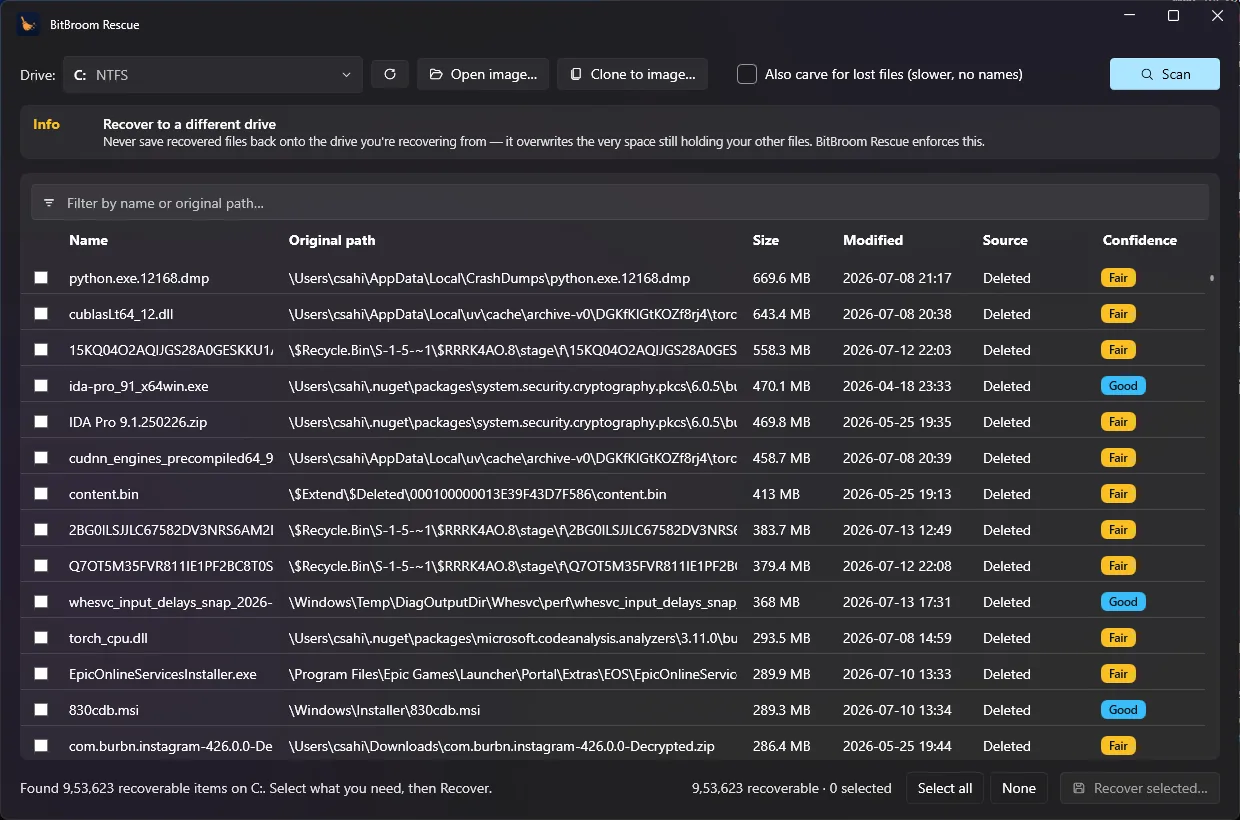
From “it's in the Recycle Bin” to “the drive is clicking” — Rescue covers the whole spectrum, and tells you honestly which one you're in.
Full MFT walk: deleted records, original folder paths reconstructed, resident and fragmented data followed through runlists. A real system drive scan enumerates 950k+ deleted files in seconds — read-only.
FAT32 and exFAT engines recover deleted camera photos, dashcam clips and documents — long filenames stitched back together from what survives on disk, timestamps preserved.
Parses the Bin's $I/$R records for original paths and deletion times, and surfaces Volume Shadow Copy snapshots — the two highest-confidence recoveries, checked first.
When the file system is gone, signatures find the files: JPEG, PNG, HEIC, PDF, ZIP/DOCX, MP4/MOV (box-aware sizing for multi-gigabyte videos), MP3, RAR, SQLite and more — every hit validated before you see it.
ddrescue-style two-pass imaging: grab everything readable fast, retry the bad spots gently, map what's lost — then recover from the image so the dying drive is stressed exactly once. Validated on a real drive that died mid-clone.
Every file is scored High / Good / Fair / Poor with the reason. SMART and TRIM are checked up front — on a TRIMmed SSD it tells you deleted content is likely gone instead of selling you a “deep scan” of zeros.
Installing to, scanning from, or recovering onto the source drive overwrites deleted data. Rescue makes those mistakes structurally impossible.
Don't trust claims — it's MIT-licensed. Read the safety model or the code itself.
Every minute of normal use overwrites a little more of what you lost. The first rule of data recovery is simple: stop writing.
 Drive full of junk instead?
BitBroom Cleaner reclaims the hidden gigabytes — with the same safety-first engineering.
Meet Cleaner →
Drive full of junk instead?
BitBroom Cleaner reclaims the hidden gigabytes — with the same safety-first engineering.
Meet Cleaner →

Free forever. Portable — unzip on a different drive and run.
First launch, Windows may say “Windows protected your PC.” That's Microsoft SmartScreen flagging a new app that hasn't been downloaded by many people yet — not a sign anything's wrong. Click More info → Run anyway. BitBroom Rescue is open source, and every download has a SHA-256 checksum you can verify.